Golden Grace for Blogger Blogging Theme


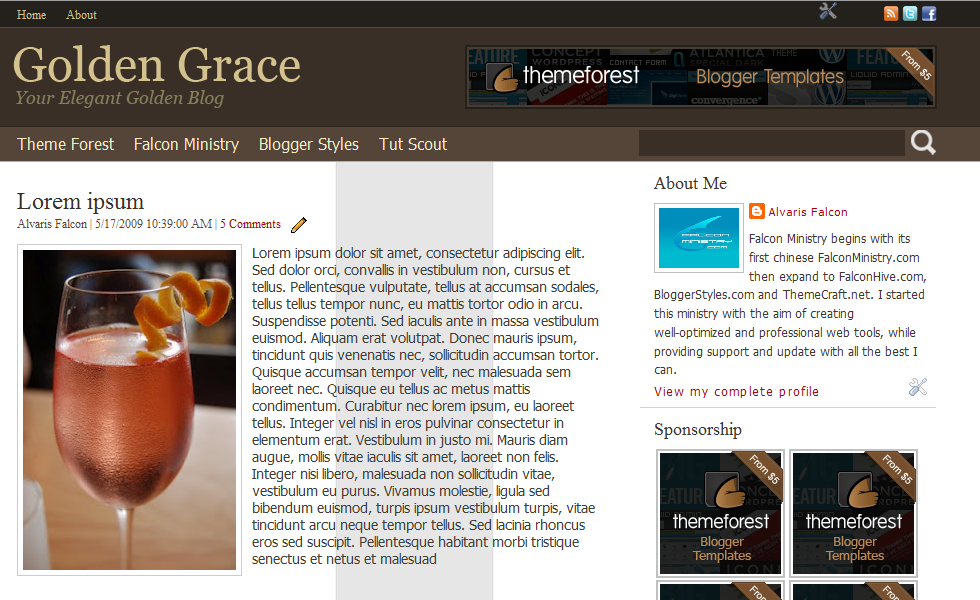
Golden Grace is a clean and professional Blogger template designed for blogger who needs a clean and professional environment to present content.
Feature
- Header Navigation Menu- Create your own navigation menu that links to anywhere.
- Social Network Link Section- Show at least 3 of your social network link beside the page menu.
- Header’s PSD file for customization- Create your own header title or logo.
- 468×60 Ads Gadget- Place your 468×60 ads including Google Adsense ads beside the header.
- 125×125 Ads Gadget- Place your 125×125 ads including Google Adsense ads in the sidebar, unlimited ads space.
- Flickr Show Gadget- Show your own Flickr’s image/ photostream.
- Jump Link feature- Show your preferred post content in the home page.
- SEO Friendly- Optimized template for your better SEO startup.
- Bonus: Add more social network icons into your social network link section.
Support
For any template issue, you can leave a comment (recommended) or contact us through alvaris924@gmail.com. We would try our best to answer your comment within 3 business days.
Version 1.10 Note
- Fixed Image Border’s Color
- Fixed Blog Pager’s Position
- Fixed Backlinks’ Position
- Replaced Top Navigation Menu Feature with Blogger Page Feature
- Replaced ‘Read More’ Feature with Blogger Jump Link Feature
- Added Variable Definition for Blog Title
- Added Variable Definition for Description
- Optimized Post Reaction Feature
- Improved Template Structure
Version 1.20 Note
- Added Blogger Share Button Feature
- Updated Installation and Customization Manual to
- Fix the latest term used by Blogger system
- Make your installation and customization easier
Background Image Emergency Fix
Our precious users report that the sidebar’s grey background has moved to the blog post area. We deeply apologize for any inconvenience caused, and here is the offered solution to solve the issue:
First of all, click this link to confirm if you’re the victim of this issue.
1. Access to your Blog’s Dashboard
2. Click on the ‘Template’ option
3. Click on ‘Edit HTML’
4. Search for the code (Keyboard shortcut for Windows User, CTRL+F), https://blogger.googleusercontent.com/img/b/R29vZ2xl/AVvXsEjmeb6seWQm1qhVVVtrG7dX44ji_LkCvQVb0t5OJToF7lYYDz0pBZVqlMuxC8x1lFuR4OfNbejzBgIJxb8AbzBeVufqur9BBvJhLFs-2hO5ENXPxVBr9if1Dwtm6iBWHdEqVmpt2XsLupTp/
5. Replace with the code, https://blogger.googleusercontent.com/img/b/R29vZ2xl/AVvXsEh2_RHmN_7sMrE8_kG7sT8unya71Fhhy5otbYv76v462flRtHvg5MfhQZ8Td0y0wmnD-hVdq7axVoRO7i-FT-Z_J52FGgDW1MK84EZE3RsuC5yfiwauFtogru3RNGCnk2ZdY9v_UZ4EB_ci/s970/contentwrap.png
6. Click ‘Save Template’ to save the template and congrats, you did it!
I’m currently submitting the latest version of the template that solves this issue to the ThemeForest, and I will announce the approval once the theme is approved.



Can you please let me know if this template can be used with wordpress?
ReplyDeleteIf not, can you please advise any other blog company that I can use the template with?
Thanks,
Carol
Hi Clippersnipper,
ReplyDeleteNice to meet you! Golden Grace Blogger template can only be used with the company Blogger, and you can create or register a Blogger account from the link below:
http://www.blogger.com
Hope my reply helps, all the best!
The Post Date is not showing up on my blog posts, although it is set to display above the title in the settings. Can you please advise?
ReplyDeletewww.fobarmour.blogspot.com
I uploaded the theme and I need to set up my blog.please take a look and suggest,http://easiestwaystoloseweight.blogspot.in/
ReplyDeleteTitle and description of my blog goes beyond header.How to get rid of that?
Hi Srisai,
ReplyDeleteNice to meet you, and sincerely thanks for your purchase!
Sure, I deeply apologize that your blog title and description are too long, thus breaking the coded layout of this template. You can refer to the link below for the ideal length of your blog title and description.
http://golden-grace-template.blogspot.com/
Besides, if you insist to put the title and description that you wrote on the top of the blog, I will suggest that you create a post with the post title name as your current blog title name, and the post content as your current blog description.
This solution will require you to create another great title for your blog, but so far this is the best solution I could think of.
Again I apologize for the inconvenience caused, and many thanks for viewing this reply. Enjoy blogging!
After uploading this template I found a grey strip in the middle of my blog page. But that grey strip is not there in your sample preview. the is looking very bad. Below is my blog address, please see and give the solutions.
ReplyDeletehttp://cmsdindia.blogspot.in/
regards,
Nand Chopra
Email: nand.chopra@gmail.com